Playdate (PD) Dev Series 1: About Developing for the Playdate
Hey everyone, this will be a new series of posts about my time with Playdate development. I am thinking of this as more of my thoughts and notes rather than a full-blown devlog on how I did/am doing things, but I still hope people might find this useful.
I will try to intentionally keep the posts short and straight to the point. For this first one, I just want to mention why I chose to develop for the Playdate console, how I am approaching learning how to develop for it, and what my first project is.
Why Playdate
I’ve had my Playdate since March 2025, so a bit more than a year, and I fell in love with the simple form factor, the 1-bit non-backlit screen, the crank interaction, and the charm of the many games the community is creating. It’s sort of nostalgic, like going back to an age where games were simple but fun.
Due to different real-life circumstances, 2026 allows me to spend a bit more time on side projects and focus on things I would like to explore. Game development was always on my list, and the Playdate, along with the awesomely supported Playdate SDK is perfect for me to experiment and scratch that itch.
My plan is to go over a small introduction to the Lua language and then dive into the Playdate SDK using the official documentation, community tutorials, and open-source code.
Learning
I started learning Lua and the Playdate SDK at the beginning of March. Here are the resources I used in order:
- Read the Designing for Playdate official documentation
- Read the top part of the Inside Playdate SDK official documentation up to and including section 5, Developing in Lua
- Watched the Lua tutorial videos from SquidGod - highly recommended
- Went through the basic setup instructions to get the development environment ready on my Mac.
- Watched more tutorials by SquidGod that focus on the Playdate SDK (how to build a simple game, how sprites work, etc.).
- Checked the examples/source code that come with the simulator. At this point, I was feeling happy that I knew the basics and could start developing my own project.
My 1st Project
As usual, I started thinking about game ideas as soon as I downloaded the SDK, before even understanding how it all works. I decided to make a game that was too complex for a beginner starting PD dev, so my app development background took over and came up with an idea for a simple app for the Playdate as my first project.
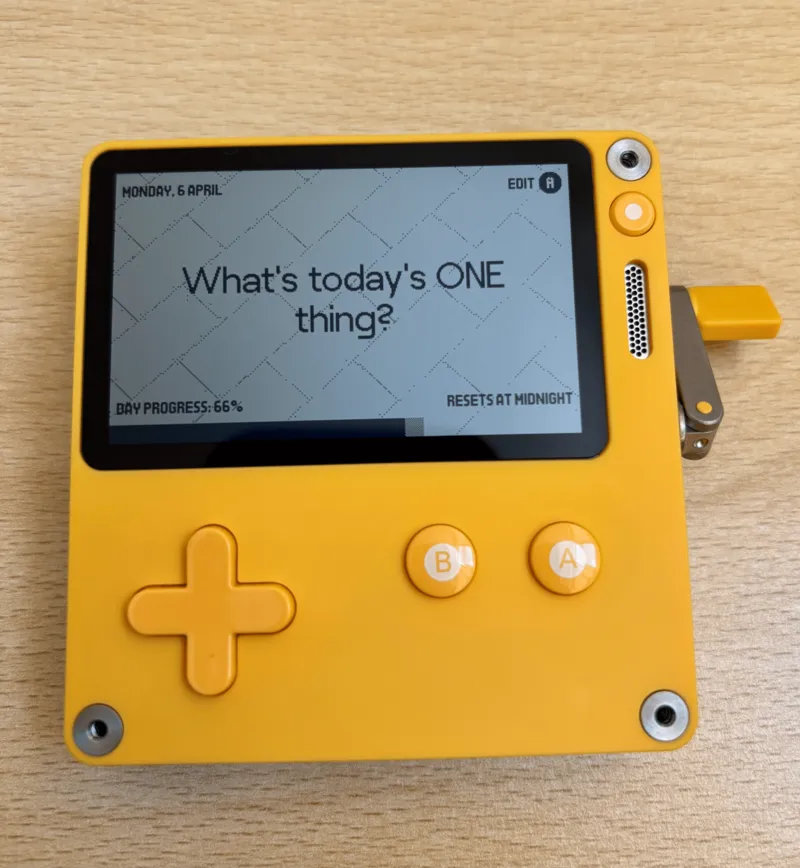
JustOne is a simple, minimalistic desk companion app focusing on the one thing that matters, inspired by The One Thing by Gary W. Keller and Jay Papasan. The app aims to help you focus on the most important thing each day.
The aim is for me to learn the concepts of sprites, user interaction with the crank and D-Pad, scene management, data persistence, drawing text, and the general game/app lifecycle.
Here is a sneak peek:
As this post is getting a bit long already, I will finish it here and provide more details on the app’s features and functionality in the next post. Hope you enjoyed reading this, and feel free to reach out with any questions or feedback.
Koke